Tether: one desk, two Macs
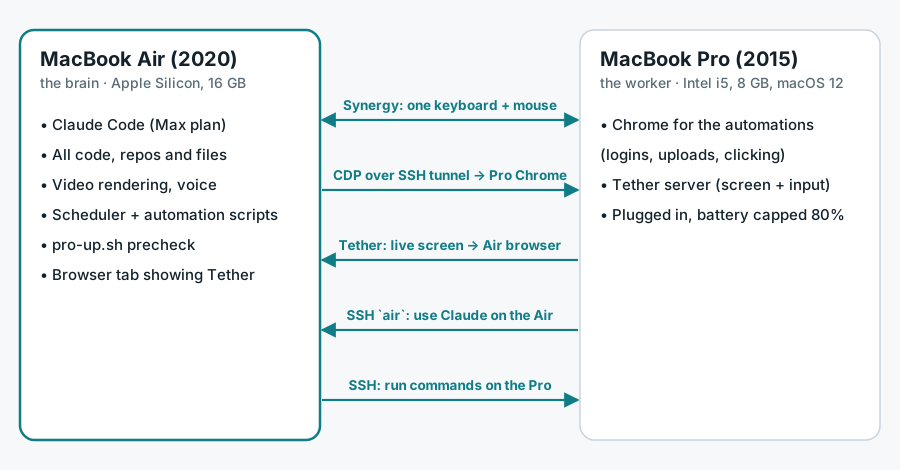
An old MacBook Pro with a swollen battery, brought back as a second worker. The MacBook Air keeps the code, the files and Claude. The 2015 Pro is taking over the Chrome automations, so the Air stays free for the real work.
The problem
My 2015 MacBook Pro has a swollen battery. macOS reports it as Service Recommended after only 187 cycles, so the laptop lives plugged in on the corner of the desk. It was too good to throw away, and my MacBook Air was doing everything at once: code, Claude, video rendering, and a pile of Chrome automations that log in, upload and click all day.
Before trusting the Pro with work I checked whether the bad battery slows it down. Under full load on all 4 threads, plugged in, it ran at 2,520 MHz, 94% of its rated 2.7 GHz. A battery throttle would show 800–1,500 MHz. To be kinder to the battery I capped charging at 80% with bclm.
How the two Macs work together
| Piece | What it does |
|---|---|
| Tether | My own browser remote: the Pro's live screen plus mouse and keyboard in any browser, no app to install. |
| Synergy | One keyboard and mouse for both Macs: the Pro sits to the right of the Air, and the pointer just slides across. |
| Chrome over a tunnel | Automation scripts stay on the Air but drive the Pro's Chrome through the Chrome DevTools Protocol over SSH, so the page loading and clicking happen on the Pro. |
air command | From the Pro, one word opens Claude Code on the Air over SSH. Claude Code needs macOS 13 and the Pro is stuck on 12, so the Air does the thinking. |
Tether: from ~150 ms to ~14 ms per frame
I first built Tether in June 2026 so a 2012 iPad stuck on iOS 10 could control the Pro. Parsec, NoMachine and modern VNC apps won't install on iOS 10, but its browser still works, so the screen had to come through the browser.
The first version ran screencapture and sips for every frame: about 150 ms each. Profiling showed the cost was starting new processes and writing to disk, not the network. Capturing and encoding inside the Python process (mss + Pillow), with HTTP keep-alive, brought it to about 14 ms per frame, with frames of 6–42 KB depending on the quality setting.
| v1 | v2 | v3 (in-process) | |
|---|---|---|---|
| Frame time | ~150 ms | ~80 ms | ~14 ms |
| Frame size | ~200 KB | 57 KB | 6–42 KB |
Stack: Python standard-library http.server with threads, mss for capture, Pillow for resizing, JPEG and drawing the cursor, PyObjC/Quartz for the real cursor position, cliclick for mouse and keyboard, and plain HTML/JS on the client so it runs on very old browsers.
Moving the Chrome automations to the Pro
The scheduled jobs (job-board applications and social-media uploads) need a real, logged-in Chrome. Before each run, a precheck script makes sure the job will use the Pro's Chrome and never quietly fall back to the Air:
- Is the Pro reachable over SSH? If not, the run is skipped.
- Start the right Chrome profile on the Pro if it isn't running.
- Open an SSH tunnel from a local port on the Air to that Chrome's debugging port.
- Check that the local port really is the Pro's Chrome by comparing the browser's websocket id on both ends.
# The local port must be the Pro's Chrome, never a browser on this Mac.
want=$(ssh_pro "curl -s -m 3 localhost:$RPORT/json/version" | ws_id)
got=$(curl -s -m 3 "http://127.0.0.1:$LOCAL/json/version" | ws_id)
[ -n "$want" ] && [ "$want" = "$got" ] || { echo "skip: port $LOCAL is not the Pro's Chrome"; exit 1; }
echo "Pro ready: $PROFILE Chrome is on 127.0.0.1:$LOCAL"pro-up.sh. Exit 1 tells the scheduler to skip the run.The first job moved over is the daily job-board run at 8:05 AM: since 19 Oct 2026 its precheck is pro-up.sh, so it uses the Pro's Chrome or doesn't run at all. The social-media automations are next.
Using Claude from the old laptop
Over SSH, macOS keeps the login keychain locked, so Claude Code on the Air says "Not logged in". The air command on the Pro runs this small script on the Air:
#!/bin/zsh
# Run over SSH from the 2015 MacBook: unlock the keychain so Claude sees the Max login, then pick a session.
security unlock-keychain ~/Library/Keychains/login.keychain-db || exit 1
cd ~/orca/workspaces/playground-macos/personal_random
exec claude --resume "$@"
~/.local/bin/air on the Air. On the Pro, air is an alias for ssh -t mcknx@<air> air.Choices and limits
- The Pro is the slower machine, so it gets long, boring jobs (Chrome automations), not urgent ones. Claude, rendering and the code stay on the Air.
- Tether has no password. It is a personal tool for my home Wi-Fi only.
- Client work never goes on the Pro. It only runs my personal automations.
- Only the daily job-board run has moved so far; the social-media automations are still being switched over.
- The swollen battery still needs replacing. Software can't fix that.
Honest note: a personal setup, not client work. The numbers come from my own runs: Tether's frame times from its README, the battery and CPU figures from system_profiler and powermetrics on the Pro, and the job move from the scheduler's own settings on 19 Oct 2026.